

CRON Expressions in Scheduled Apex (with Example)

Automation is at the heart of enterprise software, and Salesforce is not different. Though automation scenarios for many are taken care of by tools such as Flow and Process Builder, there are instances where you want granular control over scheduling and execution this is where Scheduled Apex and Cron Expressions enter the picture.
What Is a Cron Expression?
A Cron Expression is a string of special format that specifies the timing on which a job needs to be executed. It consists of 7 fields within Salesforce and instructs the platform when to invoke a scheduled Apex job.
Cron Expression Syntax
Here’s the format of a cron expression used in Salesforce:
Seconds Minutes Hours Day_of_month Month Day_of_week Year
Allowed Values:
| Field | Values | |
| Seconds | 0–59 | |
| Minutes | 0–59 | |
| Hours | 0–23 | |
| Day of Month | 1–31 | |
| Month | 1–12 or JAN–DEC | |
| Day of Week | 1–7 or SUN–SAT | |
| Year (optional) | 1970–2099 |
Important: You must use ? in either the Day of Month or Day of Week field to avoid conflicts.
Special Characters Explained
| Symbol | Meaning |
| * | Every value |
| ? | No specific value (used in day-of-month or day-of-week) |
| – | Range (e.g., MON-FRI) |
| / | Increment (e.g., 0/15 = every 15 minutes) |
| , | List (e.g., MON,WED,FRI) |
Examples of Cron Expressions in Salesforce
| Task | Cron Expression | Meaning |
| Daily at 6 AM | 0 0 6 * * ? * | 6 AM every day |
| Every Monday at 9 PM | 0 0 21 ? * MON * | 9 PM every Monday |
| 1st of every month at 1 AM | 0 0 1 1 * ? * | 1 AM on the first day of each month |
| Every 15 mins | 0 0/15 * * * ? * | Every 15 minutes |
| Weekdays at 8 AM | 0 0 8 ? * MON-FRI * | 8 AM from Monday to Friday |
When and Why to Use Scheduled Apex
There are certain scenarios where automation tools like Flow are limited:
- When you need complex Apex logic to run periodically.
- When you need asynchronous batch processing.
- When data needs to be cleaned, recalculated, or synced regularly.
Scheduled Apex fills this gap by allowing you to schedule an Apex class to run at a specific time, using a Cron Expression.
Anatomy of a Scheduled Apex Class
To use Scheduled Apex, follow these steps:
- Create a class that implements the Schedulable interface.
- Override the execute(SchedulableContext sc) method.
- Schedule it using System.schedule() and a Cron Expression.
Step-by-Step Example: Auto-Archiving Inactive Cases Every Sunday at 3 AM
Let’s build a job that archives inactive Cases (cases closed more than 90 days ago) every Sunday at 3 AM.
Step 1: Create the Apex Class
public class ArchiveInactiveCasesJob implements Schedulable {
    public void execute(SchedulableContext sc) {
        // Fetch Cases that are closed for more than 90 days
        List casesToArchive = [
            SELECT Id, Status, ClosedDate
            FROM Case
            WHERE Status="Closed"
              AND ClosedDate < LAST_N_DAYS:90
        ];

        for (Case c : casesToArchive) {
            c.Status="Archived";
        }

        if (!casesToArchive.isEmpty()) {
            update casesToArchive;
            System.debug(casesToArchive.size() + ' cases archived.');
        } else {
            System.debug('No cases to archive.');
        }
    }
}
Step 2: Schedule the Job with a Cron Expression
You can schedule the job via Anonymous Apex in the Developer Console:
String cronExp = '0 0 3 ? * SUN *'; // Every Sunday at 3 AM
String jobName="Archive Inactive Cases Job";

ArchiveInactiveCasesJob job = new ArchiveInactiveCasesJob();
System.schedule(jobName, cronExp, job);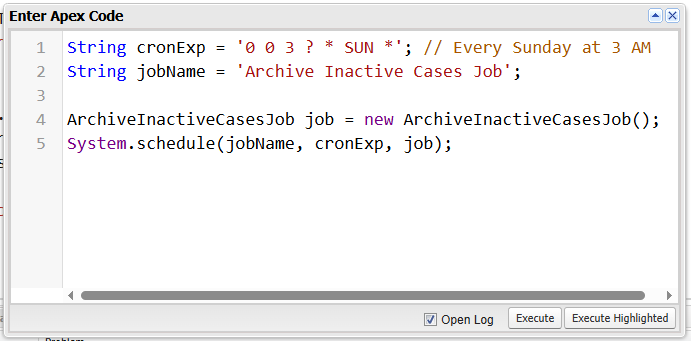
Breakdown of Cron Expression 0 0 3 ? * SUN *
- 0 → 0 seconds
- 0 → 0 minutes
- 3 → 3 AM
- ? → No specific day of the month
- * → Every month
- SUN → Every Sunday
- * → Every year
Real-World Use Cases
Here are some real-world scenarios where Cron-based Scheduled Apex is used:
| Use Case | Frequency | Cron Expression |
| Data archiving | Weekly | 0 0 2 ? * SAT * |
| External system sync (API callouts) | Daily | 0 30 1 * * ? * |
| Monthly usage report generation | Monthly | 0 0 6 1 * ? * |
| Clean up temporary records | Hourly | 0 0 0/1 * * ? * |
| Salesforce-to-ERP invoice sync | Weekdays | 0 0 5 ? * MON-FRI * |
Salesforce Limits for Scheduled Apex
Before you go wild with scheduled jobs, keep these limits in mind:
| Limit | Value |
| Max scheduled Apex jobs per org | 25 |
| Max concurrent Apex jobs (Queueable/Batches) | 5 |
| Max number of classes implementing Schedulable | No limit, but be cautious |
| Max number of jobs per user via UI | 100 |
To see all scheduled jobs:
- Go to Setup → Scheduled Jobs
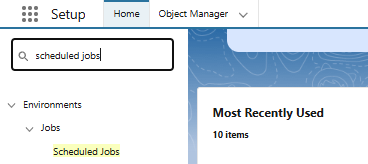
- From here, you can abort, reschedule, or monitor jobs.
Best Practices for Using Scheduled Apex
| Practice | Description |
| Avoid Hardcoded Values | Use Custom Metadata or Custom Labels for thresholds or logic |
| Monitor Jobs | Check Scheduled Jobs regularly for failures or overruns |
| Use Try-Catch | Catch exceptions and send error emails/log errors |
| Clean Up Old Jobs | Unschedule jobs that are no longer needed |
| Use Batch Apex | If processing more than 50k records, combine with Batch Apex |
| Limit Schedule Count | Use single job to do multiple tasks (strategy pattern) |
FAQ – Cron Expressions in Scheduled Apex
No, the minimum unit in Salesforce is 1 minute.
Yes, as long as the total job count is under the org limit (25 scheduled jobs).
Yes, you can construct the cron string in Apex based on your logic.
Conclusion
Cron Expressions’ Scheduled Apex is a great tool for adding time-based automation to your Salesforce setup. For lengthy, CPU-intensive, or background processes that must run without disturbing users, it’s perfect. Knowing the Cron syntax, structuring your code correctly, and following best practices are the keys to getting the most out of it. Scheduled Apex remains the standard tool in every developer’s toolbox, even as Salesforce continues to advance in sophistication.
