

Security Anti-Patterns in Lightning Web Components
You write a Lightning web component. It works in your scratch org. You deploy it. And then it silently returns wrong data in production — no errors, no warnings, just the wrong result. If this sounds familiar, you’ve probably run into Lightning Web Security (LWS). But the real problem isn’t LWS itself; it’s misunderstanding what LWS actually does.
This is the first post in a series on common anti-patterns in Lightning Web Components (LWC). In this post, you’ll learn how the three security layers in the Lightning platform work, which APIs are namespaced versus blocked, and how to avoid the most common mistakes that lead to silent failures in production. The patterns covered here apply to any custom LWC running on the Salesforce Platform.
Note: LWS distortions can change between Salesforce releases as the platform evolves. The LWS Distortion Viewer is the live source of truth for the exact behavior of every distorted API. If a pattern in this post no longer matches what you observe in your org, check the Distortion Viewer first before filing a bug.
Three security layers instead of one
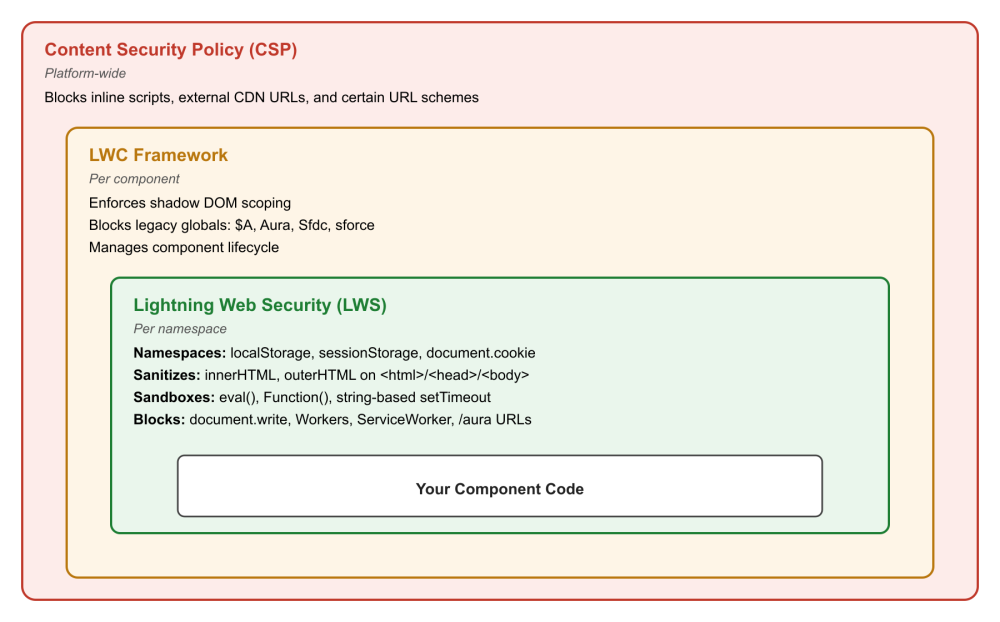
Your LWC code runs inside three independent security layers. Knowing which layer does what saves you hours of debugging.
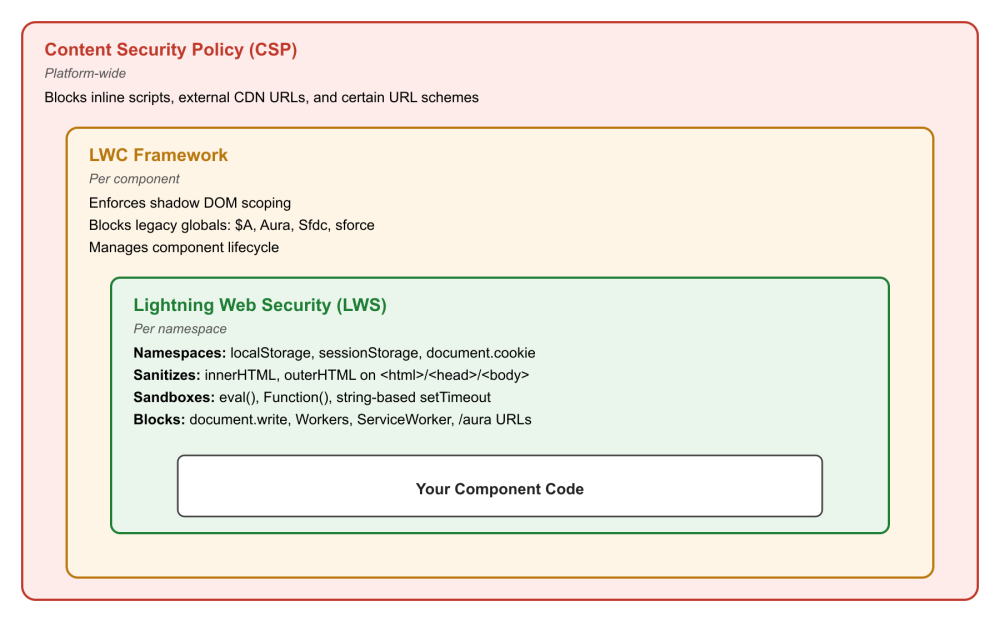
Lightning Web Security (LWS) is the namespace isolation layer. It places your component’s JavaScript in a sandboxed environment and applies distortions to browser APIs. Distortions don’t simply block APIs — they namespace storage, sanitize HTML on shared DOM elements, sandbox code evaluation, and block only a small number of APIs that could escape the sandbox. You can see every distortion and its exact behavior in the LWS Distortion Viewer.
The LWC framework enforces shadow DOM scoping, prevents access to legacy Aura globals like $A, and manages the component lifecycle.
Content Security Policy (CSP) and platform-level restrictions block inline scripts, external CDN loading, and certain URL schemes. These operate independently of LWS.
When something doesn’t work, your first question should be: which layer is responsible? Getting this wrong leads to workarounds that solve the wrong problem.
Five key anti-patterns
The patterns below fall into five categories. The first three describe how LWS distorts APIs — namespacing, sanitizing/sandboxing, and outright blocking. The fourth covers what happens at the boundary between namespaces. The fifth covers patterns that look like LWS issues, but actually come from the LWC framework or CSP. Identifying the right category is usually the fastest path to the right fix.
1. Namespaced APIs
LWS does not block these APIs — it applies a namespace isolation layer. The APIs function as expected within your own component set, but they remain blind to data established by the platform or by components residing in other namespaces.
Assuming localStorage and sessionStorage are global
LWS does not block localStorage (see docs) or sessionStorage (see docs). It namespaces them. Every key is transparently prefixed with LSKey[namespace], so each namespace gets its own isolated storage. When you call localStorage.setItem('myKey', 'value') in namespace c, Salesforce actually stores LSKey[c]myKey. Your component sees only its own keys.
This means localStorage works — but only within your namespace. If you expect to read keys set by the platform or by a component in a different namespace, you’ll get back null with no error.
// Returns null — the key was set outside this namespace's sandbox
connectedCallback() {
    const token = window.localStorage.getItem('sessionToken');
}
Use localStorage for same-namespace persistence like caching user preferences. For cross-namespace data or system-level state, use custom settings, Apex calls, or the Lightning Message Service.
Assuming document.cookie is global
Like storage, document.cookie (see docs) is namespaced by LWS, not blocked. The getter returns only cookies belonging to your sandbox, and the setter adds a sandbox prefix to new cookie keys. Platform cookies and cookies from other namespaces are invisible.
Don’t rely on document.cookie to read platform or cross-namespace cookies. Use server-side Apex to access session or authentication state instead.
2. Sanitized and sandboxed APIs
LWS does not block APIs like innerHTML (see docs), eval() (see docs), or Function() (see docs). Instead, it applies specific distortions based on the execution context. The key to avoiding silent failures is understanding exactly how the platform modifies these behaviors rather than attempting to bypass them entirely.
DOM mutation on shared elements
LWS runs in the main window, where <html>, <head>, and <body> are shared across all components. LWS protects these shared elements by sanitizing HTML strings and restricting which child elements you can add. For elements inside your component’s own shadow DOM, these APIs work normally.
Here’s the key distinction: innerHTML, outerHTML, insertAdjacentHTML, and related APIs are not blocked. They’re sanitized when targeting shared elements, and unrestricted on elements your component owns.
// innerHTML works on component-owned elements — but this is still an XSS risk
renderedCallback() {
    const container = this.template.querySelector('.container');
    container.innerHTML = `${this.userProvidedValue}`;
}
LWS will sanitize this if container is a shared element, but the real issue is the Cross Site Scripting (XSS) risk. Relying on LWS sanitization as a security mechanism is fragile — it protects shared DOM elements, not your component’s shadow DOM.
Use LWC’s declarative template directives (lwc:if, for:each, template expressions) for dynamic content. For trusted rich text from a CMS, use lightning-formatted-rich-text (see docs).
Code evaluation is sandboxed, not blocked
This one surprises many developers: eval() (see docs) and the Function() (see docs) constructor are not blocked by LWS. They run inside the sandbox — LWS ensures the evaluated code executes in the same sandboxed context as your component. Passing a string to setTimeout() (see docs) or setInterval() (see docs) works the same way.
eval('1 + 1') returns 2 in a Salesforce org. But eval() is still a bad practice. It makes code harder to analyze, blocks compiler optimizations, and creates injection vectors if the evaluated string includes user input.
// eval works in the sandbox — but don't do this
processRule(ruleString) {
    return eval(ruleString);
}
Replace dynamic code evaluation with explicit logic, a lookup table, or a strategy pattern. If you need to evaluate user-defined expressions, implement a safe parser scoped to the expression language you support.
3. APIs that are actually blocked
APIs that throw at runtime
A small number of APIs are genuinely blocked by LWS because they provide direct paths to escape the sandbox. Calling any of these throws a runtime exception.
| API | Why it’s blocked |
document.write() / writeln() |
Can write arbitrary JavaScript that bypasses the sandbox |
Worker() / SharedWorker() |
Script execution outside the sandbox |
ServiceWorkerContainer (all methods) |
Can intercept responses to run unsandboxed code |
window.find() |
Cross-namespace content access |
XSLTProcessor.transformToDocument() / transformToFragment() |
XSLT can generate HTML that bypasses distortions |
Document.parseHTMLUnsafe() / Element.setHTMLUnsafe() |
Unsanitized HTML injection |
Use LWC’s declarative template system for HTML rendering and lightning/platformResourceLoader (see docs) for script loading. There is no supported workaround for Workers inside the LWS sandbox. If your use case requires them, consider an iframe-based isolation strategy.
Network requests are not broadly restricted
fetch() (see docs), XMLHttpRequest (see docs), navigator.sendBeacon() (see docs), and fetchLater() (see docs) work normally under LWS. The only distortion blocks requests to URLs containing /aura or /webruntime — these are internal framework endpoints that your components should not access directly. All other network requests work normally, subject to standard Cross-Origin Resource Sharing (CORS) rules and your org’s CSP configuration.
// Blocked — hitting internal framework endpoints
fetch('/aura?aura.ApexAction.execute=1', { method: 'POST', body: payload });
Use Apex @AuraEnabled methods via the wire service or imperative calls instead.
4. Cross-namespace boundaries
LWS employs a proxy membrane to enforce strict isolation across namespace boundaries. Consequently, objects traversing this boundary exhibit different behaviors compared to those residing within a single namespace. For further details on the performance impacts of this membrane proxying, consult the LWS Performance documentation.
Cross-namespace object isolation
When your component receives an object from a different namespace — through an @api property, event detail, or a shared service — and you mutate that object in place, the change is not propagated back outside the sandbox. No error is thrown. The originating component just keeps seeing the original value. This is one of the hardest LWS traits to diagnose because the only symptom is stale data.
For more on the performance implications of cross-namespace membrane proxying, see the LWS Performance documentation.
// childComponent.js — namespace 'c'
@api record;

handleEdit() {
    // Mutation is silently absorbed by the LWS proxy — parent never sees it
    this.record.Name="Updated Name";
}
Clone the received object before modifying it, then communicate changes back with a CustomEvent.
handleEdit() {
    const updated = { ...this.record, Name: 'Updated Name' };
    this.dispatchEvent(new CustomEvent('recordchange', {
        detail: { ...updated }
    }));
}
Passing objects across namespace boundaries
Objects passed between components in different namespaces are wrapped in LWS Proxy objects (see docs). Proxy unwrapping can fail silently, giving you null or incorrect values on the receiving end. Browser extensions that listen to custom events also receive null for detail when it contains a proxied object.
// Namespace 'foo' — dispatching
this.dispatchEvent(new CustomEvent('selected', {
    detail: { record: this.selectedRecord }  // may arrive as null in another namespace
}));
Ensuring your object can be structured cloned is the key. Or, serialize the payload to JSON before dispatching and parse it on receipt. A plain string crosses the namespace boundary without proxy wrapping.
// Namespace 'foo'
this.dispatchEvent(new CustomEvent('selected', {
    detail: JSON.stringify(this.selectedRecord)
}));

// Namespace 'bar'
handleSelected(event) {
    const record = JSON.parse(event.detail);
}
5. Misattributed restrictions
These patterns fail at runtime, but the cause is not LWS. Blaming LWS leads to the wrong fix.
Referencing legacy Salesforce globals
The LWC framework (not LWS) blocks access to $A, Aura, Sfdc, and sforce in Lightning web components. These belong to the Aura framework or are deprecated platform globals. Any reference to them in LWC code fails at runtime.
This is the most common mistake when migrating Aura components to LWC.
// Pattern carried over from Aura — fails at runtime
connectedCallback() {
    const userId = $A.get('$SObjectType.CurrentUser.Id');
}
Use the LWC platform equivalents instead.
import userId from '@salesforce/user/Id';
import { getRecord } from 'lightning/uiRecordApi';
import NAME_FIELD from '@salesforce/schema/User.Name';
For a complete mapping, see the Migrate Aura Components to LWC documentation.
Loading third-party scripts from external CDNs
Loading a JavaScript library with a <script> tag pointing to an external CDN URL violates Salesforce’s CSP. The platform blocks it before LWS even comes into play. Beyond the CSP violation, external CDN loading introduces a versioning risk: the CDN may update the library at any time, silently introducing sandbox incompatibilities.
connectedCallback() {
    const script = document.createElement('script');
    script.src="https://cdn.example.com/somelib/v3.min.js"; // CSP violation
    document.head.appendChild(script);
}
Download the library, upload it as a Static Resource, and load it with lightning/platformResourceLoader.
import { loadScript } from 'lightning/platformResourceLoader';
import SOMELIB from '@salesforce/resourceUrl/somelib';

async renderedCallback() {
    if (this._libLoaded) return;
    this._libLoaded = true;
    await loadScript(this, SOMELIB);
    this.initializeLib();
}
Test the static-resource version in a sandbox before promoting to production. If the library requires APIs that LWS blocks (like Workers or document.write), it won’t work inside Salesforce regardless of how you load it.
Conclusion
These anti-patterns share a root cause: misunderstanding which security layer does what. LWS doesn’t block most things — it namespaces, sanitizes, and sandboxes. The APIs it actually blocks are a small, specific set. Meanwhile, the LWC framework and CSP enforce their own independent restrictions.
The mental model to remember: LWS is a namespace isolation layer, not a blanket firewall. When an API seems “blocked,” it’s usually namespaced — you’re looking at an empty namespace, not a wall. When in doubt, check the LWS Distortion Viewer for the exact behavior.
In the next post in this series, we’ll cover data and communication: the Wire Service, @api properties, and event handling. These are the three surfaces where most component-to-component bugs originate, and where a few common misunderstandings cause the most trouble.
Resources
- LWS Distortion Viewer — the definitive reference for every LWS distortion and its behavior
- Lightning Web Security architecture
- LWS Performance — performance implications of cross-namespace membrane proxying
- Lightning Web Security Developer Guide
- Migrate Aura Components to LWC
About the author
Tim Dionne is a PMTS on the Customer Centric Engineering team. He’s worked on many UI features of Salesforce over the years, starting with VisualForce, Aura Components, and Lightning Web Components with an emphasis on Lightning Web Security and Lightning Data Service.
The post Security Anti-Patterns in Lightning Web Components appeared first on Salesforce Developers Blog.
