

Stop Inflated Meeting Metrics in Salesforce: A Simple Fix for Sales Managers
If you’re a sales manager trying to answer a simple question—
“How many customer meetings did my team have this month?”—
you might be getting the wrong answer without even realizing it. Why? Because Salesforce can quietly double (or triple) count meetings when internal attendees are involved.
When your reps send meeting invites to customers from Outlook, as an example, and include other internal employees Salesforce creates a unique Event record assigned to each internal User. This creates an issue when you’re trying to figure out how many unique meeting your team has booked in a time period. Let’s take a look at an example and a workaround.
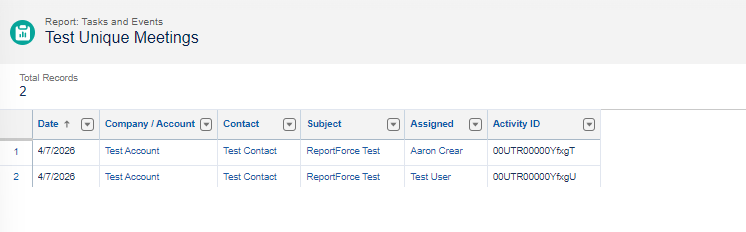
I sent a meeting invite from Outlook to Test Contact (customer) and Test User (User). The Subject was “ReportForce Test”. When I run a Tasks and Events Report I can see that there are two rows with this Subject line (filtering on Subject). I’ve added a column for Activity ID (custom formula field) just to show that these are in fact two different Event records for the same meeting. As stated above, if I was trying to count how many meeting that my team had today using this Report the total would be 2, instead of the expected 1.
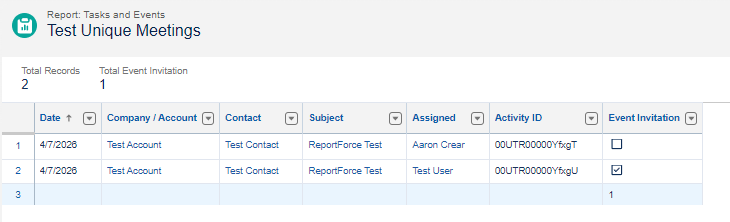
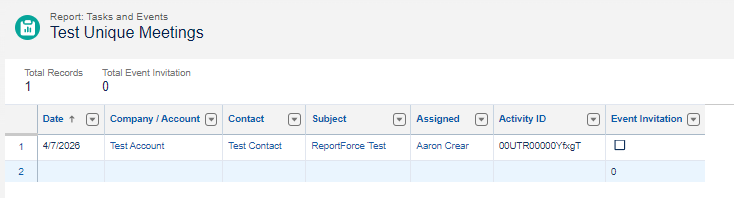
Here’s where the solution comes in. In your Report add the Event Invitation Field. You can now see that only one record has this box checked. Since I was the sender of the meeting invite my Event record will have this Field unchecked. My colleague, Test User, was an invitee so his will be checked. Now all I need to do is filter my Report to Event Invitation = False and I will have an accurate count of meetings.
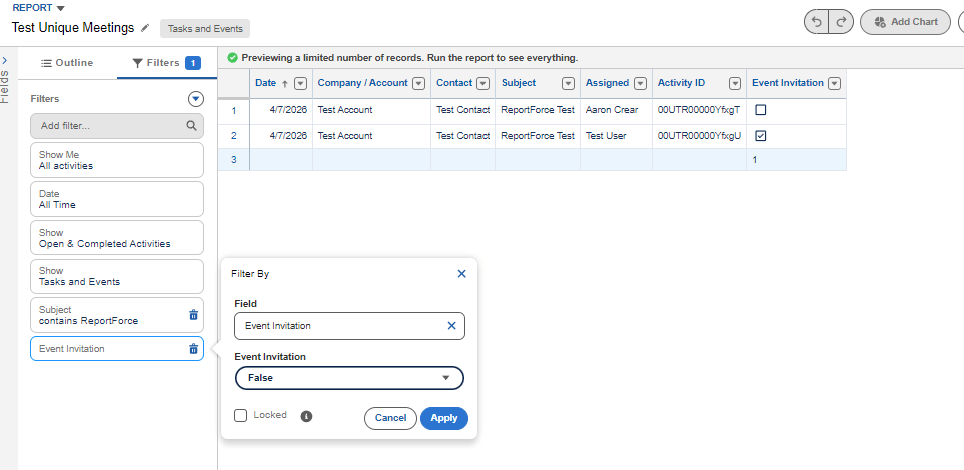
Let’s see a demo of how we did this.
